Watch: Apache Kafka for beginners
A short walkthrough covering the same ground as this guide — useful as a primer before the deep dive, or a recap afterwards.
1. Start with the problem
Imagine a food-delivery application. You place an order using a mobile app.
After that, several things need to happen — almost all at once:
- The restaurant must receive the order.
- The payment service must process the payment.
- The delivery service must find a delivery partner.
- The inventory service must update item availability.
- The notification service must send you an update.
- The analytics system must record the transaction.
- The fraud-detection system may need to inspect it.
One action — Order Placed — creates work for many different systems.
The challenge isn’t only sending the data. The system must also handle:
- Services becoming temporarily unavailable
- Sudden traffic spikes
- Duplicate events
- New services being added later
- Events processed at different speeds
- Data needing to be replayed
- Failures without losing important information
That is the problem Apache Kafka helps solve.
2. What was commonly used before Kafka?
Kafka didn’t appear in a world with no messaging or integration tools. Applications already communicated using several approaches.
Direct service-to-service communication
The Order Service directly calls Payment, Inventory, Notification, Delivery and Analytics services.
Order Service
    ├── calls Payment Service
    ├── calls Inventory Service
    ├── calls Notification Service
    ├── calls Delivery Service
    └── calls Analytics Service
This can work well for small systems. But as the number of services grows, the Order Service must know where every service lives, what API it exposes, how long to wait, what to do on failure, how to retry — and whether one failure should cancel the whole operation. The services become tightly coupled: adding a Recommendation Service may require modifying and redeploying the Order Service.
Shared database integration
Multiple applications read from and write to the same database.
Order Service ──┐
Payment Service ├── Shared Database
Inventory       ┤
Reporting       ┘
Database tables become shared contracts. One application depends on another’s schema, a schema change ripples across many systems, services can bypass each other’s business rules, and the database becomes a central bottleneck that every system competes for.
Database polling
A service repeatedly asks: “are there any new orders?”
Every 10 seconds:
SELECT * FROM orders WHERE processed = false;
Poll too often and you create unnecessary database load; poll too rarely and you introduce delay. The application also has to track which rows are already processed and decide what happens when processing fails halfway through.
Scheduled jobs and batch processing
Systems exchange files or run scheduled jobs every few minutes or hours. This works when immediate processing isn’t required — but not for real-time notifications, fraud checks, live dashboards, or instant inventory updates.
Traditional message queues
A producer places a message in a queue and a consumer processes it later — still a valid, useful architecture.
Producer → Queue → ConsumerKafka was designed around a different model: a distributed, durable event log where events can be retained and independently read by multiple consumers, rather than treating every message as something that must disappear after its first successful processing.
3. Why was Kafka introduced?
Kafka was originally developed at LinkedIn, which needed to move large volumes of activity data between systems — page views, searches, ads, and user interactions. LinkedIn described Kafka as a persistent, efficient, distributed messaging system when it open-sourced the project in 2011.
The goal was a system that could act as a central event backbone. Instead of every application directly integrating with every destination, applications could publish events to Kafka — and other systems could consume those events independently.
Application A ──→ Application B
Application A ──→ Application C
Application A ──→ Application D
Application A ──→ Database E
Application A ──→ Analytics FApplication A ──→ Kafka ──→ Application B
├──→ Application C
├──→ Application D
├──→ Database E
└──→ Analytics FThe producer doesn’t need to know every consumer. Consumers don’t need to run at the same speed. A new consumer can be added without changing the original producer. This creates loose coupling between systems.
4. What is Apache Kafka?
Beginner definition
Apache Kafka is a system that receives events from producers, stores those events in ordered logs, and allows one or more consumers to read them.
Producer → Kafka → ConsumerMore precise definition
Apache Kafka is an open-source, distributed event-streaming platform. Breaking that down:
Open source
Kafka’s source code is publicly available and maintained as an Apache Software Foundation project.
Distributed
Kafka runs across multiple servers, distributing work and data for scalability, availability, performance, and fault tolerance.
Event streaming
Kafka continuously handles events as they occur — a fact that happened, not a command asking another system to do something.
An event normally represents something that happened:
{
  "eventType": "ORDER_CREATED",
  "orderId": "ORD-10045",
  "customerId": "CUS-2009",
  "totalAmount": 1499.00,
  "occurredAt": "2026-08-05T10:30:00Z"
}
This is a fact: “Order ORD-10045 was created.” Interested systems can react to that fact.
5. A simple real-world analogy
Kafka as a digital event highway
Imagine a highway used by delivery vehicles.
- Producers place packages onto the highway.
- Kafka organizes and carries those packages.
- Topics represent different routes.
- Partitions are parallel lanes.
- Brokers are distribution centres maintaining those routes.
- Consumers collect the packages they are interested in.
- Offsets identify how far each consumer has travelled.
- Consumer groups divide the collection work between multiple workers.
- Replication keeps backup copies in case one distribution centre fails.
- Retention determines how long packages remain available.
The analogy isn’t technically perfect, but it builds a useful mental model:
6. Where does Kafka sit in a system?
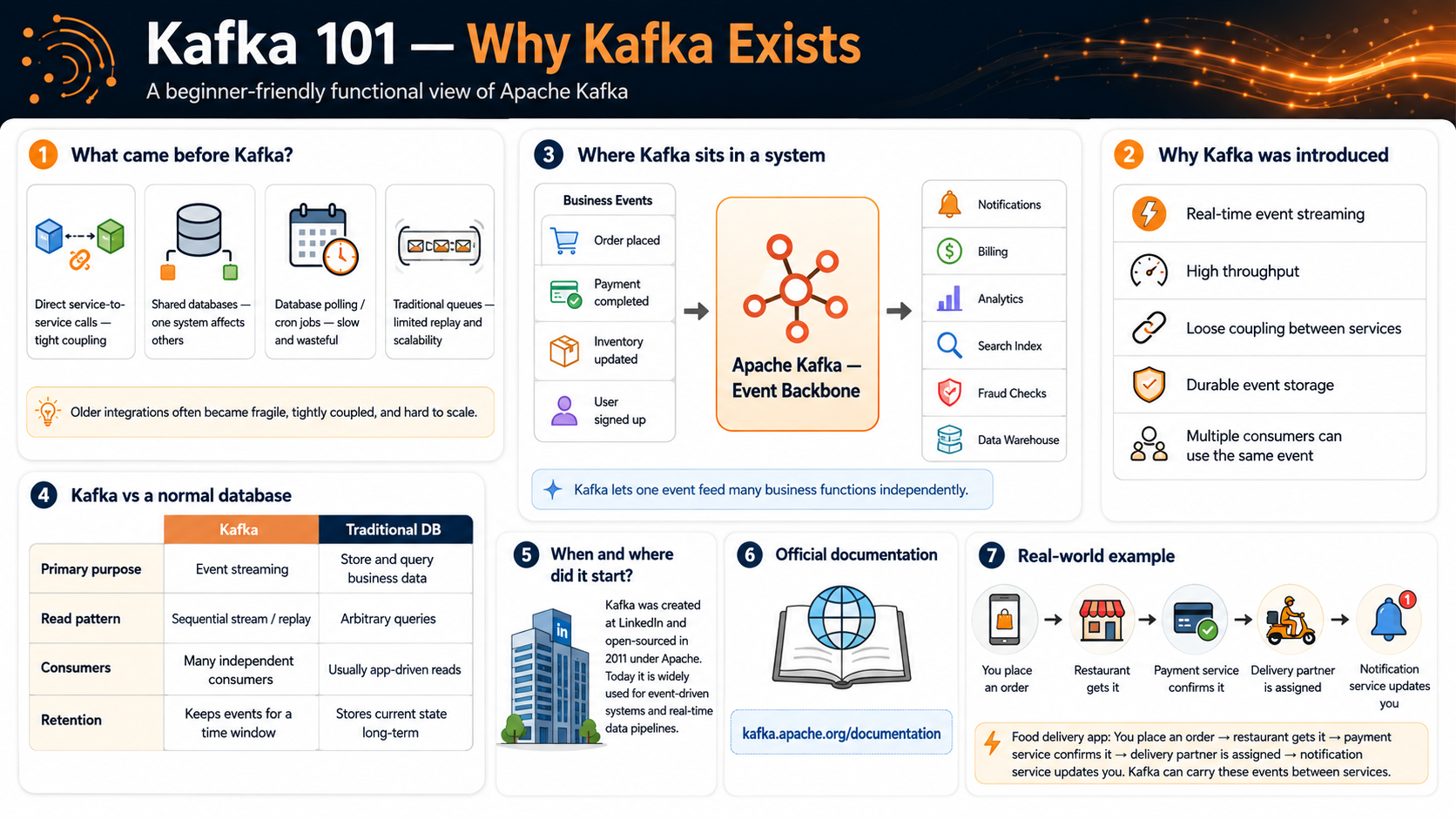
Functional perspective
From a business perspective, Kafka sits between event-producing systems and event-consuming systems. It doesn’t usually create the business event itself — it transports, stores, and distributes the event so interested applications can respond.
BUSINESS EVENTS
────────────────────────────
Order placed
Payment completed
User registered
Inventory updated
Shipment dispatched

             │
             ▼

      APACHE KAFKA
       Event Backbone

             │
             ▼

BUSINESS REACTIONS
────────────────────────────
Send notification
Update analytics
Reserve inventory
Start delivery
Check for fraud
Update search index
Store in data warehouse
Functional example
Suppose the Order Service publishes OrderCreated. Different systems react independently:
OrderCreated
    ├── Payment Service starts payment processing
    ├── Inventory Service reserves products
    ├── Notification Service sends confirmation
    ├── Analytics Service records a sale
    ├── Recommendation Service updates preferences
    └── Fraud Service evaluates the transaction
The Order Service doesn’t need to call all six services directly. It publishes one event; Kafka makes that event available to the interested consumers.
7. Developer perspective: without Kafka and with Kafka
Without Kafka
This code looks simple at first glance.
public void createOrder(Order order) {
    orderRepository.save(order);

    paymentClient.startPayment(order);
    inventoryClient.reserveItems(order);
    notificationClient.sendConfirmation(order);
    analyticsClient.recordOrder(order);
    deliveryClient.findPartner(order);
}
But consider what happens when:
- Payment succeeds but inventory fails.
- Notification Service is unavailable.
- Analytics takes five seconds to respond.
- Delivery Service times out.
- A new Fraud Service must be added.
- The same request is accidentally retried.
The Order Service becomes responsible for coordinating every external system.
With Kafka
The Order Service just publishes the event.
public void createOrder(Order order) {
    orderRepository.save(order);

    kafkaTemplate.send(
        "orders",
        order.getCustomerId(),
        new OrderCreatedEvent(order)
    );
}
Separate consumers handle separate responsibilities.
@KafkaListener(
    topics = "orders",
    groupId = "inventory-service"
)
public void reserveInventory(OrderCreatedEvent event) {
    inventoryService.reserve(event);
}@KafkaListener(
topics = "orders",
groupId = "notification-service"
)
public void sendNotification(OrderCreatedEvent event) {
notificationService.sendConfirmation(event);
}Each service can:
- Process the event independently
- Retry according to its own rules
- Scale separately
- Deploy separately
- Temporarily fall behind without blocking the producer
Kafka doesn’t automatically solve every distributed-system problem, but it provides a strong foundation for handling asynchronous events.
8. Technical perspective: how Kafka works
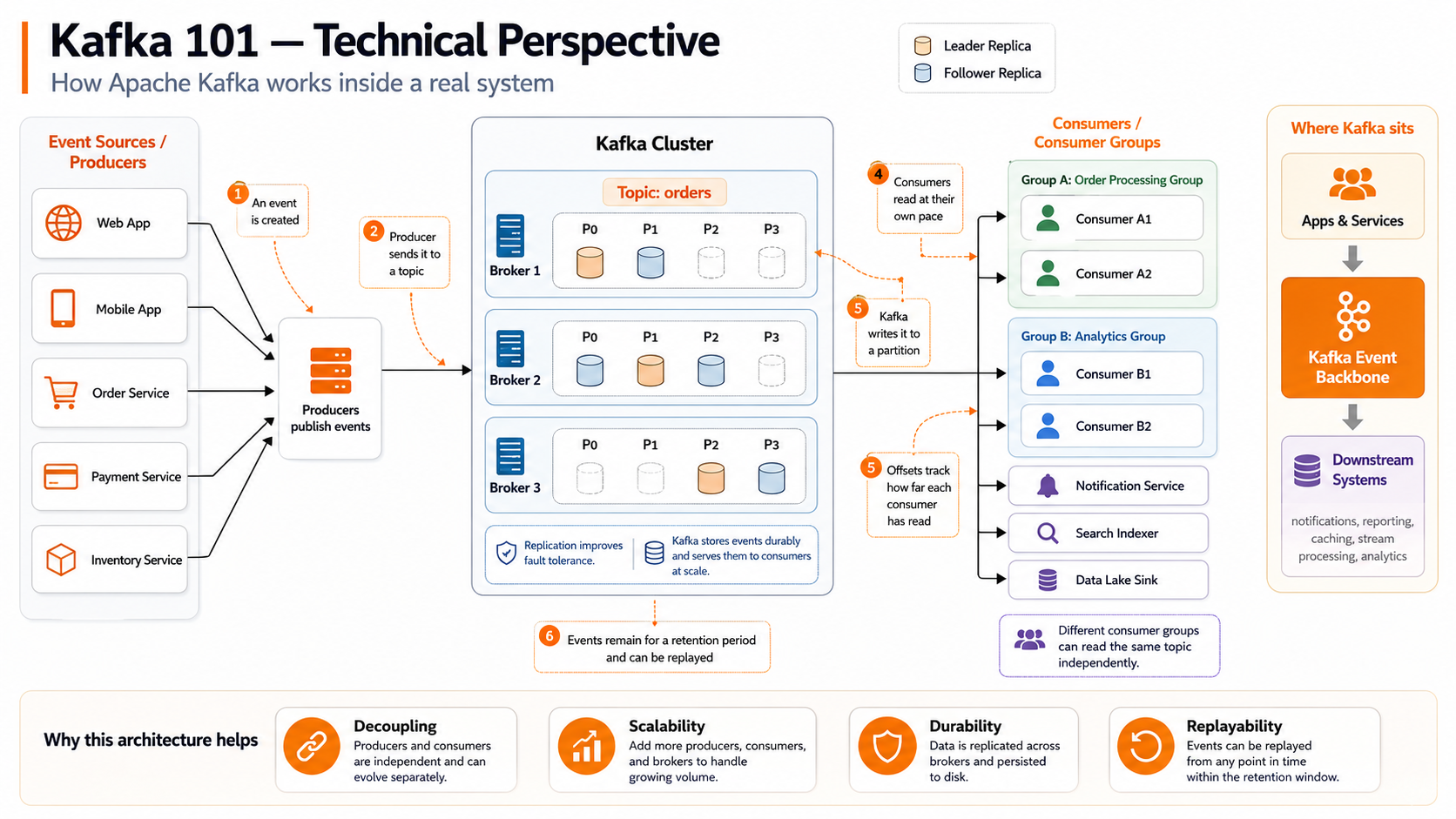
The complete flow, in eight steps:
Step 1: Something happens
A business action occurs and the application creates an event.
Customer places an order

{ "type": "ORDER_CREATED", "orderId": "ORD-10045" }
Step 2: A producer publishes the event
The producer chooses a topic and may provide a key.
Order Service → Kafka

Topic: orders
Key: customer-501
Step 3: Kafka selects a partition
A topic can be divided into multiple partitions. The event key helps determine which partition receives the event — events with the same key are generally routed to the same partition, so related events stay ordered. Kafka guarantees ordering within a topic-partition, not across every partition in the topic.
orders
    ├── Partition 0
    ├── Partition 1
    ├── Partition 2
    └── Partition 3
Step 4: A broker stores the event
A broker is a Kafka server; a cluster is a group of brokers. Partitions are distributed across brokers, and the event is appended to the end of its partition log.
Kafka Cluster              Broker 1 → orders-0
    ├── Broker 1          Broker 2 → orders-1
    ├── Broker 2          Broker 3 → orders-2
    └── Broker 3
Step 5: Kafka assigns an offset
Every event inside a partition receives a position called an offset, meaningful within that specific partition. The combination Topic + Partition + Offset identifies the event's exact position.
Partition 0

Offset 0 → Order A created
Offset 1 → Order A paid
Offset 2 → Order B created
Offset 3 → Order A shipped
Step 6: Consumers read the event
A consumer subscribes to one or more topics and requests events at its own pace. Kafka tracks a consumer group's committed position so processing can resume from the right offset after a restart.
Step 7: Consumer groups share the work
Within a normal consumer group, each partition is assigned to one consumer at a time — so two consumers in the same group never process the same partition simultaneously. A second, independent consumer group can read the same topic and maintain its own progress.
orders topic
    ├── Order Processing Group
    ├── Analytics Group
    └── Notification Group
Step 8: Events remain available
Reading an event doesn't delete it. Kafka retains events per the topic's retention configuration — a restarted consumer continues from its previous offset, a new consumer group can read from the start, and a consumer can deliberately replay earlier events.
9. Kafka is not a normal database
Kafka stores data, but that doesn’t make it a general replacement for a relational database. Kafka and a database solve different primary problems:
| Area | Apache Kafka | Traditional database |
|---|---|---|
| Main purpose | Moving and processing event streams | Storing and querying business state |
| Data model | Ordered event log | Tables, documents, rows or records |
| Writes | Usually appended to a partition | Insert, update and delete |
| Reads | Sequential consumption by offset | Flexible queries |
| Ordering | Guaranteed within a partition | Depends on query and transaction |
| Consumption | Multiple independent consumer groups | Applications execute queries |
| Retention | Time- or size-based; compaction is also possible | Usually stored until changed or deleted |
| Replay | Native event rereading | Usually requires history or audit tables |
| Typical usage | Events, integration and streaming | Current state and transactional data |
A common architecture uses both
Application
    │
    ├── saves current business state → Database
    │
    └── publishes what happened → Kafka
The database may store the current order state (Order 10045 = SHIPPED) while Kafka holds the history: OrderCreated → PaymentCompleted → InventoryReserved → DeliveryAssigned → OrderShipped. The database answers “what is the current state?”; Kafka can answer “what events happened, and in what order within the relevant partition?”
10. Important Kafka terminology
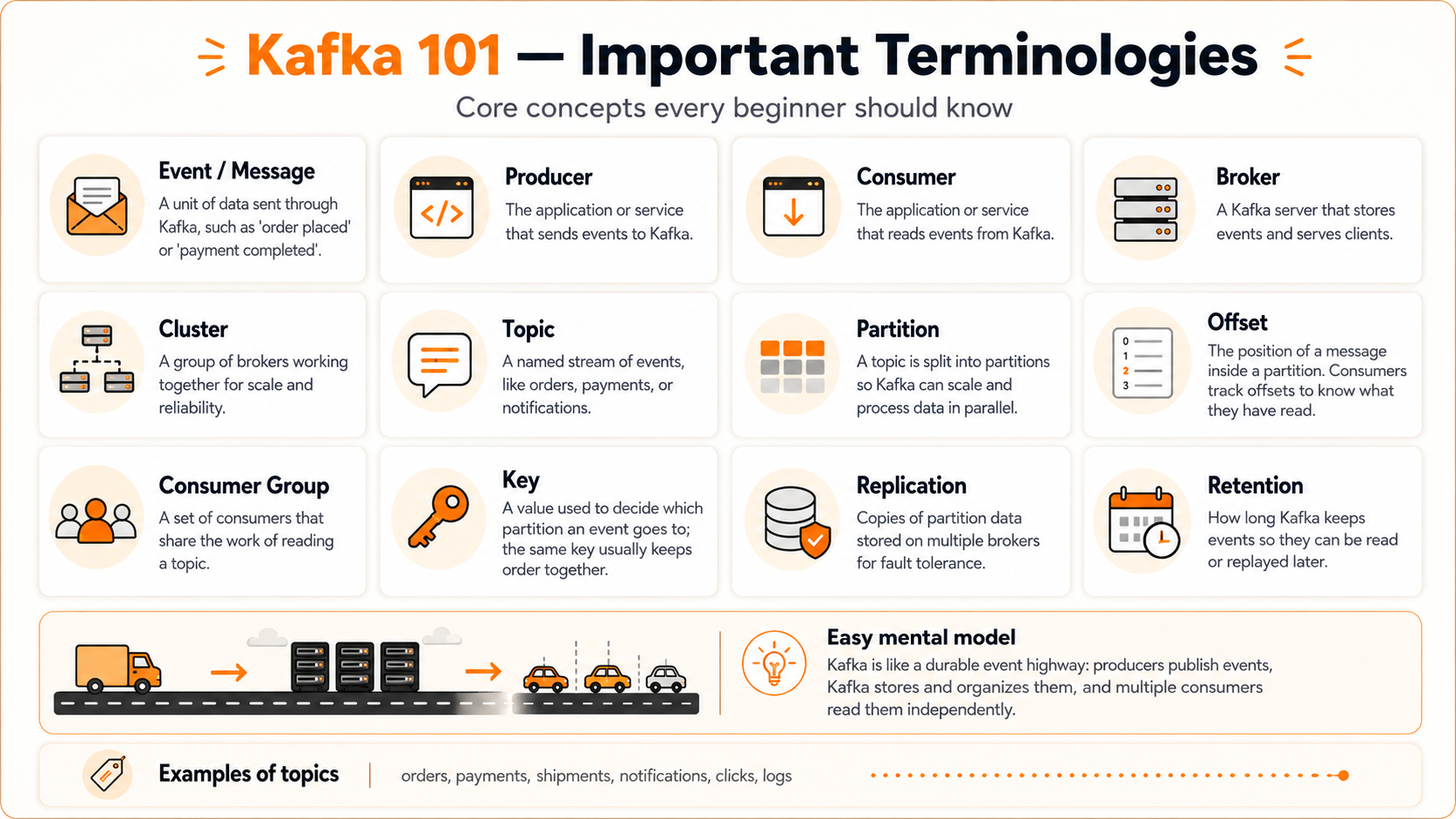
The full definitions live in the glossary — here’s the compact version you’ll use constantly:
- Event / Message
- A unit of data sent through Kafka, such as 'order placed' or 'payment completed'.
- Producer
- The application or service that sends events to Kafka.
- Consumer
- The application or service that reads events from Kafka.
- Broker
- A Kafka server that stores events and serves clients.
- Cluster
- A group of brokers working together for scale and reliability.
- Topic
- A named stream of events, like orders, payments, or notifications.
- Partition
- A topic is split into partitions so Kafka can scale and process data in parallel.
- Offset
- The position of a message inside a partition. Consumers track offsets to know what they have read.
- Consumer group
- A set of consumers that share the work of reading a topic.
- Key
- A value used to decide which partition an event goes to; the same key usually keeps order together.
- Replication
- Copies of partition data stored on multiple brokers for fault tolerance.
- Retention
- How long Kafka keeps events so they can be read or replayed later.
Example topics: orders, payments, shipments, notifications, clicks, logs.
11. Understanding ordering
A frequent beginner misunderstanding is:
Partition 0: A → B → C
Partition 1: X → Y → Z
Kafka preserves A before B before C, and X before Y before Z — but it doesn’t provide one automatic total order across both partitions.
How to preserve ordering for one entity
Use a stable key: Key = orderId. All events for the same order can then be directed to the same partition, preserving the sequence OrderCreated → PaymentCompleted → OrderShipped.
order-101 → P1
order-101 → P1
order-101 → P112. Understanding consumer groups visually
Assume a topic has four partitions: P0 P1 P2 P3
Consumer 1 → P0, P1, P2, P3Consumer 1 → P0, P1
Consumer 2 → P2, P3Consumer 1 → P0
Consumer 2 → P1
Consumer 3 → P2
Consumer 4 → P3Consumer 1 → P0
Consumer 2 → P1
Consumer 3 → P2
Consumer 4 → P3
Consumer 5 → Idle
Consumer 6 → IdleAdding consumers beyond the available partitions doesn’t increase traditional consumer-group parallelism for that topic.
orders topic
    ├── Group A: Inventory Service
    ├── Group B: Notification Service
    └── Group C: Analytics Service
Each group independently consumes the topic — Kafka doesn’t make the three groups compete for one shared copy.
13. How Kafka handles failure
Suppose a consumer reads an event and then crashes. Kafka doesn’t depend only on the consumer’s memory — the consumer group can continue from its last committed offset. Depending on when the offset was committed, the event may be processed again. This is why Kafka applications should often be designed for idempotency.
Idempotency in simple terms
Processing the same event twice shouldn’t produce an incorrect result. Instead of blindly adding a payment twice, the application can check a unique transaction ID — “has transaction TX-9001 already been processed?” If yes, the duplicate is safely ignored.
Kafka provides delivery and transactional capabilities, but application-level correctness still depends on how the producer, consumer, database, retries, and offset commits are designed.
14. Modern Kafka and KRaft
Older Kafka tutorials frequently mention Apache ZooKeeper. Modern Apache Kafka uses KRaft, Kafka’s built-in metadata quorum. Kafka 4.0 became the first major Kafka release operating entirely without ZooKeeper, and ZooKeeper mode was removed from Kafka 4.x.
For a beginner lesson, the simplified architecture is:
Kafka Cluster
    ├── Brokers store and serve event data
    └── KRaft controllers manage cluster metadata
You may still encounter ZooKeeper in older production systems and older learning material, but new Kafka 4.x explanations should start with KRaft.
15. When should you use Kafka?
Kafka can be a strong choice when a system needs:
Event-driven microservices
Services communicate by publishing and reacting to business events (OrderCreated, PaymentCompleted, ShipmentDispatched).
Real-time data pipelines
Data continuously moves between applications, databases, search engines, analytics platforms, data warehouses and data lakes.
High-volume event processing
The system needs to handle large and continuous streams of data.
Independent consumers
Multiple applications need to process the same event for different purposes.
Replayability
Past events may need to be processed again — rebuilding a search index, recalculating analytics, recovering after a consumer failure, testing a new service against retained data.
Application decoupling
Producers shouldn't require direct knowledge of every downstream consumer.
Audit-style event history
A durable sequence of business events is valuable on its own.
Kafka is widely used for high-performance data pipelines, event-driven applications, streaming analytics, and data integration.
16. When should you not use Kafka?
Kafka adds operational and architectural complexity. It may be unnecessary when:
- A simple API call solves the requirement.
- Only one small application uses the data.
- The event volume is low.
- Replay is unnecessary.
- Asynchronous processing provides no benefit.
- A normal job queue is sufficient.
- The team cannot operate or monitor a distributed system.
- Immediate synchronous confirmation is mandatory.
- The real requirement is only database storage and querying.
Example
For a small application:
Contact Form → Save to Database → Send EmailIntroducing a Kafka cluster may be excessive here — a direct service call or lightweight queue may be easier to build, test, operate, and maintain.
17. Kafka, RabbitMQ and databases
A traditional message queue commonly focuses on distributing jobs or messages to workers. Kafka focuses on maintaining distributed event logs that can be retained, replayed, and consumed by independent groups. Neither approach is universally better — use the architecture that matches the requirement.
Kafka versus RabbitMQ, at a beginner level
| Requirement | Kafka is often considered | RabbitMQ-style queue is often considered |
|---|---|---|
| Retained event history | Strong fit | Not usually the central model |
| Event replay | Strong fit | Usually not the primary model |
| Stream processing | Strong fit | Less central |
| Complex message routing | More limited routing model | Strong routing capabilities |
| Work queues | Possible | Common use case |
| Multiple independent subscribers | Consumer groups | Exchanges and queues |
| Ordered partition logs | Core concept | Different queue semantics |
This is only a starting comparison. Actual selection depends on durability, ordering, throughput, routing, operational experience, latency, and processing requirements.
18. One complete example
Scenario: online order processing
The Order Service produces:
{
  "eventId": "evt-501",
  "eventType": "ORDER_CREATED",
  "orderId": "ORD-10045",
  "customerId": "CUS-20",
  "amount": 1499.00
}
Topic: orders
Key: ORD-10045
→ Partition: 2, Offset: 845Consumer groups react independently:
inventory-service-group     → reserves inventory
notification-service-group  → sends order confirmation
analytics-service-group     → updates sales analytics
fraud-service-group         → checks suspicious activity
Later, payment completes:
{
  "eventId": "evt-502",
  "eventType": "PAYMENT_COMPLETED",
  "orderId": "ORD-10045",
  "paymentId": "PAY-9009"
}
The same orderId is used as the key, so Kafka routes the related event to the same partition — supporting ordered processing for that order.
Send your first event through Kafka
Create an event and watch it travel from a producer to a topic, through a partition and broker, and finally to multiple consumers.
Create the event
{
  "eventType": "ORDER_CREATED",
  "orderId": "ORD-101",
  "customerId": "CUS-501"
}Topic: orders · 0 events stored
- No events produced yet.
Consumer groups
- Inventory Grouplag 0
- Notification Grouplag 0
- Analytics Grouplag 0
20. Common beginner misunderstandings
“Kafka is only a message queue.”
Kafka can support messaging patterns, but its retained, partitioned event-log model is broader than a basic queue.
“Kafka processes my business logic.”
Kafka stores and transports events. Your producer, consumer, Kafka Streams application, or another processing system implements the business logic.
“Reading an event removes it.”
Events are normally retained according to topic configuration, independently of whether one consumer has read them.
“A topic is the same as a queue.”
A topic may be read by multiple independent consumer groups.
“Kafka guarantees global ordering.”
Kafka guarantees ordering within an individual topic-partition.
“More consumers always means more speed.”
Useful traditional consumer-group parallelism is constrained by the number of partitions.
“Kafka replaces my database.”
Kafka and databases normally solve different problems and are frequently used together.
“Kafka automatically prevents duplicate business actions.”
Correct duplicate handling requires appropriate producer, consumer, transaction, offset, and application idempotency design.
21. Quick knowledge check
Q1.Who sends events to Kafka?
Q2.What stores and serves Kafka partition data?
Q3.Where does Kafka guarantee event ordering?
Q4.What does an offset represent?
Q5.Can two different consumer groups read the same topic?
Q6.Does consuming an event immediately delete it from Kafka?
Q7.What is the best way to keep all events for one order together?
22. Kafka 101 summary
Apache Kafka provides a durable and scalable way to move events between systems. Remember this basic flow:
Producer
    ↓
Topic
    ↓
Partition
    ↓
Broker
    ↓
Consumer Group
    ↓
Consumer
And remember these five ideas:
- A producer publishes an event.
- The event is written to a topic partition.
- A broker stores that partition.
- Consumers read events and track progress using offsets.
- Different consumer groups can process the same event independently.
23. Continue learning
- Producer Deep DiveHow producers select topics, serialize events, use keys, and handle acknowledgements.
- Storage InternalsUnderstand parallelism, ordering, partition assignment, and segment/index files.
- Consumer Deep DivePolling, offset commits, consumer lag, retries, and error handling.
- Delivery GuaranteesVisualize partition assignment, scaling, rebalancing, and idle consumers.
- Replication & DurabilityLeaders, followers, replication factor, acknowledgements, and broker failures.
24. Official Apache Kafka resources
- Official documentationkafka.apache.org/documentation/
- Official introductionkafka.apache.org/documentation/#introduction
- Official quickstartkafka.apache.org/quickstart/
- Official project homepagekafka.apache.org/
- Official source repositorygithub.com/apache/kafka
The official documentation is the source of truth for current Kafka behaviour and configuration. Blog posts and older tutorials may describe outdated ZooKeeper-based architecture or earlier Kafka versions.